


Back to: Complete Jobman Set-Up Guide for Administrators
This is an introductory lesson to explain how quotes are created and broken down in Jobman.
Each quote has four levels: Sections, Items, Lines, and Product Parts (or Components).
Quote Sections
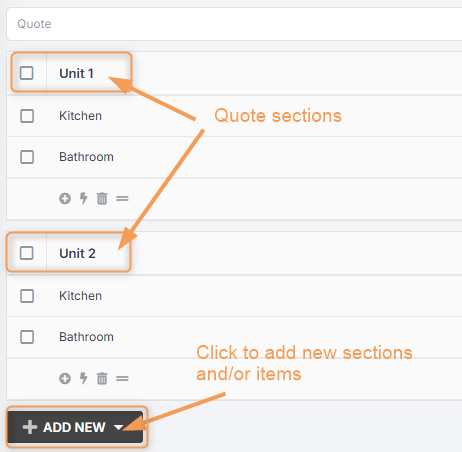
A section is simply a heading for one or more quote items. You may only want one section, called “Items”, which you can group all your quote items under. Or you might like to use sections to group items by type, area, etc.
Example of a quote for renovations to two residential units. Each section represents a unit, and contains two quote items.
Quote Items
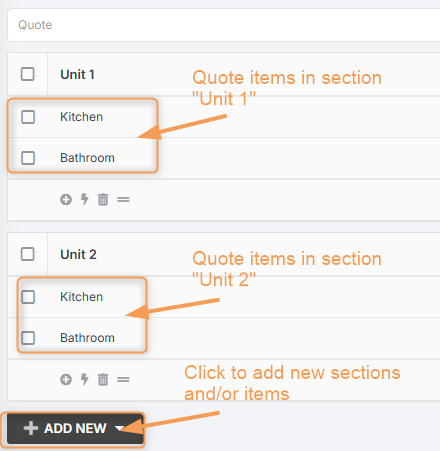
An item is like a sub-section within a quote section. Often these will be the same as lead items or job items.
Example of quote items within sections, where each section is a unit, and each item is a room inside the unit that will be renovated.
Quote Lines
Once you have added your sections and items, you must click into a quote item to add quote lines.
A quote line can be any of the following:
- Line item: a single entry in a quote that lists an item, its description (if applicable), and its price. Line items do not have any additional automation applied to them, nor are they comprised of smaller sub-items.
- Product: an item (or combination of materials, services, and labour) which your business manufactures or otherwise offers to customers, e.g. a kitchen cabinet.
- Group: a group is like a product which you build from scratch inside a particular quote. Once you have added the group as a quote item, you can click inside it and add parts, labour, materials, etc., as you would when building a product in your catalogue. Groups are useful when quoting one-off items that you don’t usually manufacture.
- Preset: adds multiple products as separate lines.
- Labour: a measure of operational time required to complete one or more tasks in a workflow. Labour is used to add costings to quotes and quote items, products, etc., to take into account the money you pay your staff to complete a piece of work.
- Material: an item which is used in manufacturing, e.g. wooden boards, hinges, steel sheets.
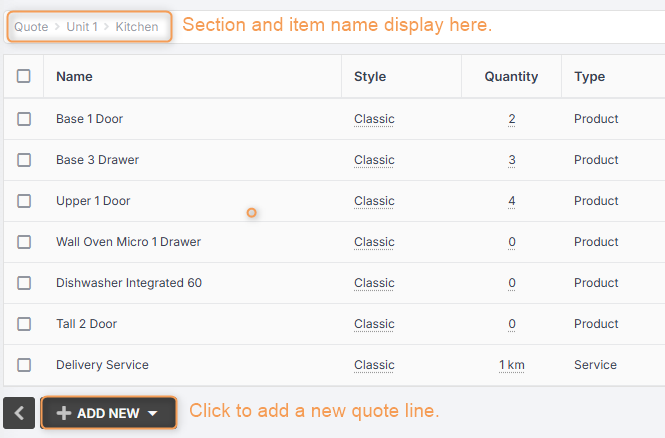
- Service: a service which you either buy from an external supplier or contractor, or which your customers buy from you. Examples: delivery, installation.
Example of quote lines within a quote item:
Product Parts (or Components)
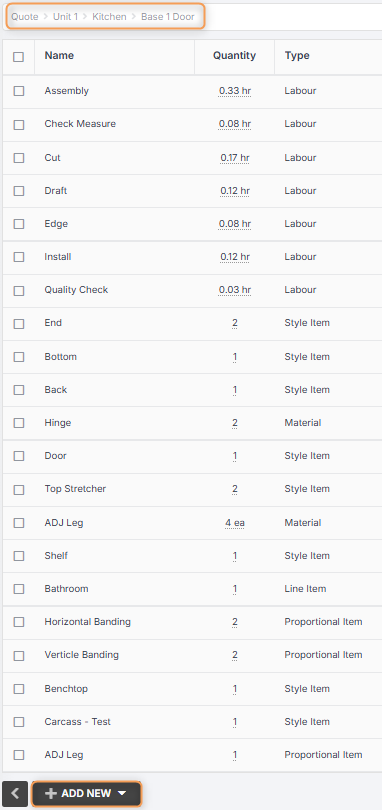
Once you have added your products, you must click into a product to view and edit product parts.
Note: You will set up your product parts when creating products in your catalogue, so you will usually not need to add these when creating a quote.
Part types can be any of the following:
- Item: Manually enter an item and a fixed price for a part of your product that is not set up in your catalogue.
- Proportional Item: Add a required material and then apply a parametric measurement for selected properties for this item (e.g. length, width, depth, volume, or weight).The pricing of the proportional item will then change according to the material price multiplied by the part size when you add your product to a quote.
- Style Item: Use for parts that have more than one range option. For example, the product might be a drawer, and the style item might be “handles”. You might use cheaper or more expensive handles across different quotes. Setting the handle as a style item allows you to easily select the option you want for each quote. Some style items are also proportional (for example, benchtops), and will require parametric measurements.
- Material: Add a specific material from your catalogue.
- Labour: Add the operation(s) required to manufacture this product, enter the duration, and click Create. Once the labour is added as a part, your quote price will adjust based on the product size and required labour time.
- Service: Add a service that may be required from an external provider, such as painting, cleaning, delivery, etc.
- Component: A component can be any of the above part types, except that it is universal to all products of a given product type. For example, you may have a component called “door”, which is a proportional item that is added to all cabinet-type products, since all cabinets will have at least 1 door.
Example of product parts within a product: